
myQ Garage Door Won’t Close: Diagnose Close Error
Troubleshoot a myQ Close Error safely. Compare the physical door state, wall control, safety sensors and any separate myQ door sensor.
Show me the steps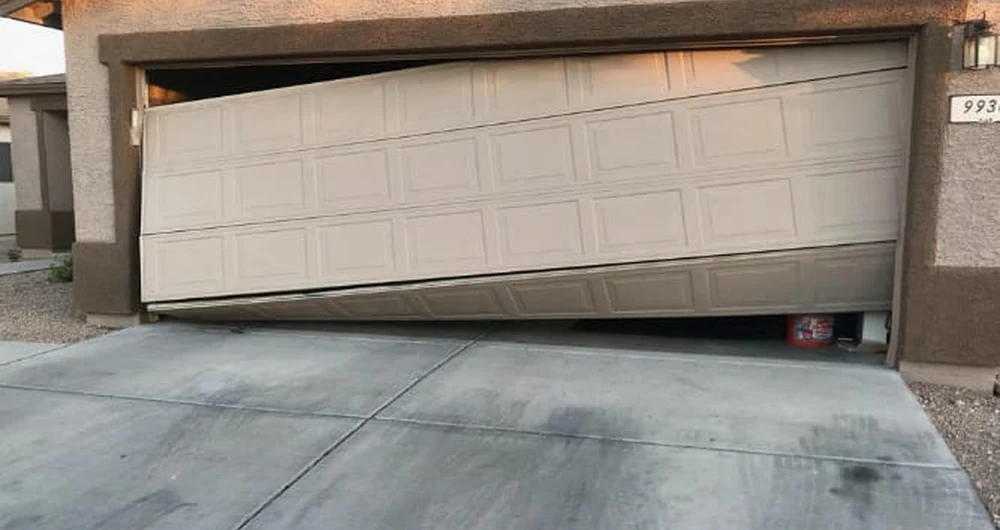
Symptoms
- Close Error appears after an attempted close.
Applies to
- App
- Consumer myQ; connected opener or hub. Battery checks apply only to a separate door sensor.
Close Error · Consumer myQ; connected opener or hub. Battery checks apply only to a separate door sensor.
Before you start
- Identify the product model and observe the exact status before making changes.
- Use only equipment and accounts you own or are authorized to manage.
Why this can happen
- A blocked doorway or safety sensor path.
- Door movement or hub sensor reporting failed.
How to check and fix it
Close Error
Keep the door in sight and its path clear; inspect for loose obstructions.
What you should seeThe path is clear.
Wall control
Observe the floor-level safety sensor LEDs and remove loose obstructions. Never bypass sensors.
What you should seeBoth sensors can see each other.
Safety sensors
With the opening clear, try one normal wall-control or remote operation.
What you should seeA successful local close can clear the app error.
Check 4
If the door is closed but the message remains, fully close and reopen the app.
What you should seeThe status refreshes.
When to stop
- Do not hold a wall button to defeat a sensor, change force settings, or release an open door as a troubleshooting shortcut.